


Most people try to learn artificial intelligence, cloud computing or digital strategy by reading about them. That is the slowest possible route. The fastest route is to touch the thing — train a model, break a supply chain, watch an attack map light up in real time — and let the concept land on its own.
What follows is a hand-checked list of 18 free interactive tools that do exactly that. No listicle filler, no dead links, no “sign up for a demo” walls. Every one of them was opened and verified in September 2026. Most work instantly in your browser with no account at all.
We start with the single best starting point — a tool that lets you train a working machine learning model in under five minutes, with your webcam, without writing a line of code.
What is inside
- Teachable Machine — build your first AI in 5 minutes
- 5 interactive explainers that make AI and the internet click
- 4 simulations that teach strategy by letting you fail
- 5 live dashboards that show where tech is actually heading
- 3 places to study how real companies won with technology
- Frequently asked questions
1. Teachable Machine: Build Your First AI Model in 5 Minutes
If you only open one link from this entire article, make it this one. Teachable Machine is a free browser tool from Google Creative Lab that collapses the distance between “AI is a mysterious black box” and “I just built one” into about the length of a coffee break.
There is no install, no account, no payment, and no code. You point your webcam at some objects, click a button, and a genuine neural network trains in front of you.
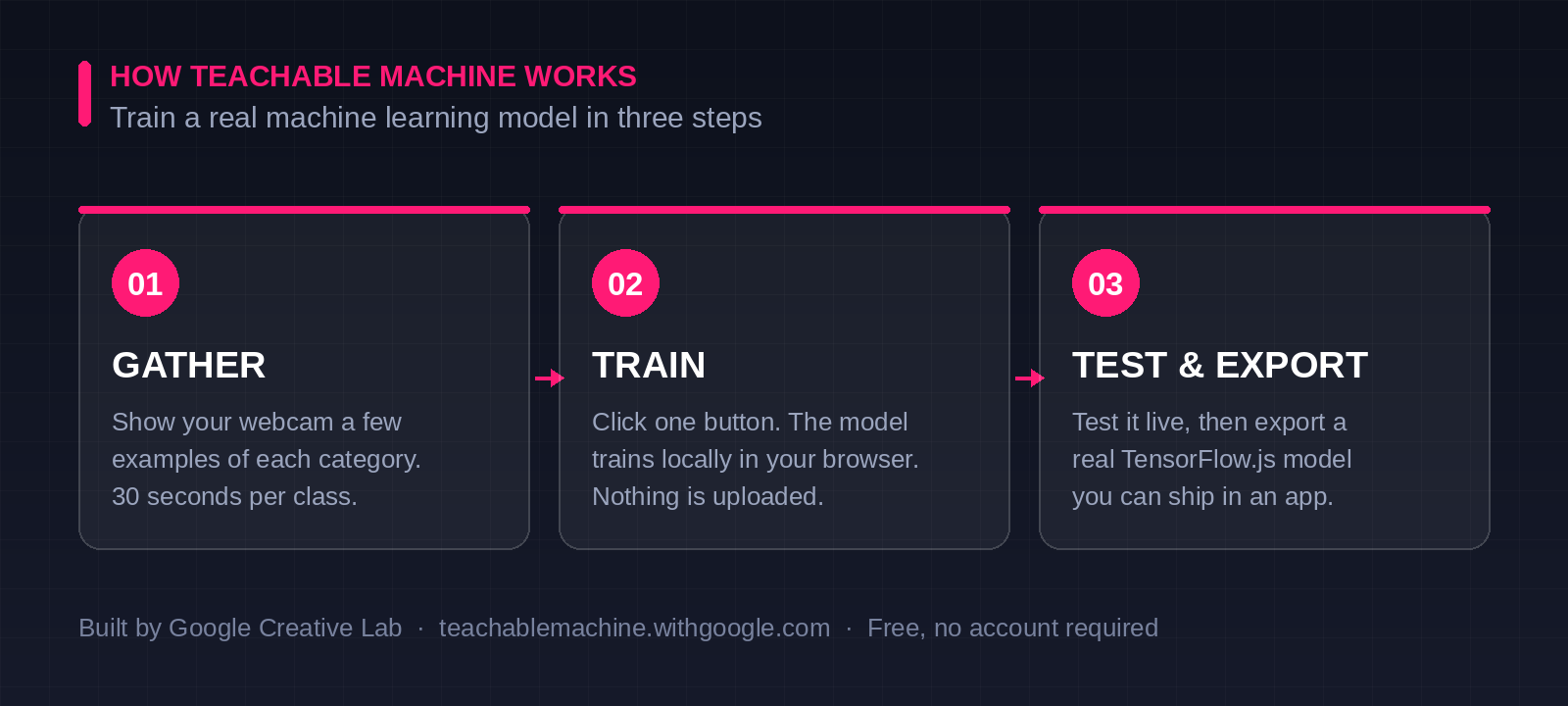
How to train your first model right now
- Open the tool and choose an Image, Audio or Pose project.
- Create two classes. Something concrete works best — “wearing glasses” versus “not wearing glasses”, or “coffee mug” versus “water bottle”.
- Hold down record for about 30 seconds per class while moving the object around. Vary the angle and lighting — this is where you quietly learn what “training data quality” actually means.
- Click Train Model. It runs locally in your browser. Nothing is uploaded anywhere.
- Test it live and watch the confidence bars move as you move.
- Export it. You get a real TensorFlow.js model that runs in any JavaScript project.
⚡ The lesson that sticks
Deliberately train it badly. Record all your examples of one class in bright light and the other in shadow, then watch the model confidently classify based on lighting rather than the object. In sixty seconds you will understand dataset bias more deeply than most articles on the subject will ever teach you.
Watch it in action
Google’s original introduction shows the core idea in under two minutes:
And this walkthrough takes you step by step through building and exporting an image classifier:
Why it matters beyond the novelty: Teachable Machine is the clearest demonstration available of how low the barrier to building AI has fallen. The strategic implication is significant — the ability to prototype with machine learning no longer sits exclusively with engineering teams. Marketers, operations leads and product managers can now build a working proof of concept before a single developer is assigned.
2. Five Interactive Explainers That Make Complex Tech Click
These take abstract ideas and hand you the controls. Each one is free and opens instantly.
What it is: An interactive visualisation from Georgia Tech that runs a live GPT-2 model inside your browser. Type any sentence and watch it travel through embedding, attention and prediction in real time.
Why it is worth your time: The temperature slider is the standout feature. Drag it and you can literally watch an AI model become more creative or more predictable, which explains a setting most people use without ever understanding. It has been used by over 600,000 people and taught in courses at MIT, Columbia and the University of Toronto.
The team behind it made a short demo showing how to read the visualisation:
What it is: A series of short interactive essays from Google’s People + AI Research team, covering fairness, hidden bias, model confidence and privacy.
Why it is worth your time: Instead of describing the trade-off between accuracy and fairness, it hands you a slider and makes you choose. You feel the tension rather than reading about it, which is why these are widely used in responsible AI training.
What it is: A free, continuously updated interactive map of every major undersea fibre optic cable on the planet, maintained by TeleGeography. Click any cable to see its owners, length, landing points and service date.
Why it is worth your time: It is a useful jolt to anyone who thinks of “the cloud” as something abstract. The global internet is a few hundred physical cables lying on the seabed, owned by identifiable companies, running through a handful of geopolitical choke points.
What it is: A drag-and-drop interface for building quantum circuits, with live visualisation of qubit states as you work. Free IBM account required.
Why it is worth your time: You are not running a simulation. You can queue your circuit on genuine IBM quantum hardware and get real results back, noise and all. Very few emerging technologies let a curious beginner touch the actual machine.
What it is: A rotating 3D globe animating detected cyberattacks worldwide as they are picked up, filterable by attack type and country.
Why it is worth your time: Security statistics in a slide deck are forgettable. Watching thousands of simultaneous attacks trace across a spinning planet is not. It is the single most effective way to make the scale of the threat landscape feel real to a non-technical audience.
3. Four Simulations That Teach Strategy by Letting You Fail
Reading about a strategic concept is not the same as being caught inside one. These let you make the mistake yourself.
What it is: The legendary MIT supply chain simulation, now playable online. You run one link in a four-stage chain — retailer, wholesaler, distributor or factory — and place weekly orders with limited visibility and delivery delays.
Why it is worth your time: A tiny bump in customer demand becomes a catastrophic swing at the factory. This is the bullwhip effect, and experiencing it is genuinely humbling. As MIT’s John Sterman puts it, every player acts rationally while the system as a whole behaves irrationally. If you want a faster version, Zensimu offers a free solo demo against AI opponents with no signup.
What it is: A free, open source tool for building Wardley Maps — diagrams that plot a business’s value chain against how commoditised each component has become.
Why it is worth your time: It turns vague build-versus-buy debates into a picture. Once you can see which parts of your operation are still custom and which have become utilities, decisions about where to invest and what to outsource become far less abstract.
What it is: A free collaborative whiteboard for Business Model Canvas, Lean Canvas and SWOT. Share a link and build a canvas with others in real time.
Why it is worth your time: The Business Model Canvas has been downloaded over five million times for a reason. Canvanizer removes the friction of printing one out — you can map a competitor’s entire business model on a shared link in twenty minutes.
What it is: A clean, browsable library of more than twenty thinking frameworks — the Iceberg Model, feedback loops, decision matrices, issue trees — each with a worked example.
Why it is worth your time: Most mental model collections are just lists of names. Untools gives every framework a concrete case, which is the difference between recognising a tool and actually being able to use it under pressure.
4. Five Live Dashboards That Show Where Technology Is Heading
Annual PDF reports are stale the week they ship. These update continuously or are built to be explored rather than skimmed.
What it is: A browsable radar plotting more than a hundred tools, techniques and platforms across four rings — Adopt, Trial, Assess and Hold. Published twice a year and sourced from real client engagements.
Why it is worth your time: It is opinionated, which is exactly what makes it valuable. Rather than listing what exists, it tells you what experienced teams think you should start using and what you should stop. Volume 34 centres on agentic AI and context engineering.
What it is: A continuously updating dashboard of global internet traffic, outages, AI crawler activity, attack trends and protocol adoption, drillable down to individual countries and networks.
Why it is worth your time: Cloudflare sees a substantial share of all internet traffic, so this is about as close to a live pulse of the web as the public can get. You can watch a national internet shutdown appear on a chart in near real time.
What it is: GitHub’s annual data report on the state of software development, built as a scrollable site with interactive charts rather than a static document.
Why it is worth your time: It answers questions everyone speculates about with actual numbers — how fast AI-assisted coding is really spreading, which languages are rising, and how the global developer population is shifting.
What it is: Stanford’s annual, heavily charted assessment of AI capability, investment, adoption and public opinion, including an interactive tool for comparing national AI ecosystems.
Why it is worth your time: It is one of the few comprehensive AI data products not produced by a company with a stake in the outcome. When you need a credible number rather than a vendor claim, this is where to look.
What it is: Interactive charts comparing how quickly technologies spread through populations, from the telephone and radio to the smartphone and generative AI.
Why it is worth your time: Add and remove technologies and watch the adoption curves race each other. The compression is striking — the telephone took roughly eighty years to reach saturation, the smartphone about a decade. It reframes every conversation about whether a new technology is moving “too fast”.
5. Three Places to Study How Real Companies Won With Technology
What it is: Free case studies and working papers from the MIT research centre that has been studying how companies generate value from IT since 1974.
Why it is worth your time: This is primary source material. The DBS Bank digital transformation case and the original Johnson & Johnson enterprise architecture work are here in full. Less clickable than the rest of this list, but the depth on genuine corporate transformations is unmatched and it costs nothing.
What it is: A continuously updated, sortable table of every private company valued above one billion dollars, with valuation, sector, country and lead investors. Free to browse; downloading the full dataset asks for an email.
Why it is worth your time: It functions as a live scoreboard of which technology-enabled business models are currently winning capital. Sorting by sector and date reveals shifts in investor conviction faster than any quarterly report.
What it is: A curated community collection of real Wardley Maps built for actual organisations, alongside essays and tooling.
Why it is worth your time: Pairs perfectly with the mapping tool listed earlier. Rather than staring at a blank canvas, you can study finished strategic artefacts produced by practitioners for real decisions.
Quick Comparison: Which Tool Should You Open First?
| If you want to… | Open this | Time needed |
|---|---|---|
| Actually build an AI model today | Teachable Machine | 5 minutes |
| Understand what is inside ChatGPT | Transformer Explainer | 15 minutes |
| Feel why supply chains break | MIT Beer Game | 30–60 minutes |
| See where tech is heading this year | Thoughtworks Radar | 20 minutes |
| Make a build-versus-buy decision | OnlineWardleyMaps | 45 minutes |
| Grasp the scale of cyber threats | Kaspersky Threat Map | 2 minutes |
Frequently Asked Questions
Are these tools genuinely free?
Yes. Every tool listed is free to access. Two have minor conditions worth knowing: IBM Quantum Composer requires a free IBM account, and CB Insights is free to browse but asks for an email address if you want to download the complete unicorn dataset. Everything else opens instantly with no signup.
Do I need coding experience to use Teachable Machine?
None at all. Teachable Machine was designed specifically for people who have never written code. You train the model by showing examples to your webcam and clicking a button. If you later want to use the model in a project, it exports as a standard TensorFlow.js file that a developer can drop straight into an application.
Is Teachable Machine safe to use with my webcam?
Your images are not uploaded anywhere. The model trains locally inside your browser using TensorFlow.js, which is also why it responds so quickly. Nothing leaves your device unless you explicitly choose to export and save your model.
Which of these is best for a complete beginner?
Start with Teachable Machine, then move to the Transformer Explainer. The first shows you that AI is buildable; the second shows you what is happening inside the models everyone is talking about. Together they take under half an hour and will change how you read every AI headline afterwards.
Will these links still work in a year?
Interactive sites disappear faster than books do. All eighteen were verified in September 2026. If one goes dark, most are well known enough that searching the tool name will surface a current mirror or successor.
Start With One
The temptation with a list like this is to bookmark it and return to it never. Do not do that. Pick one — ideally Teachable Machine — and give it five minutes right now.
The gap between reading about a technology and having built something with it is enormous, and it closes faster than most people expect. Five minutes from now you could have trained a neural network. That is a genuinely different relationship with the subject than you had when you opened this page.
Found this useful?
Subscribe to ReadClub for more hands-on guides to technology, research and higher education.
Explore more articles →
